
SQLite has a reputation problem. It ships as the default in phones, browsers, and half the desktop software you own, and yet the moment someone suggests it for a web application the objection is automatic: it doesn't scale.
That objection is usually right about the wrong thing. SQLite's limit is not read throughput, data size, or query complexity. It is concurrent writes, and the difference between a SQLite deployment that survives production and one that collapses under load is almost entirely about understanding that single constraint.
The one-writer rule
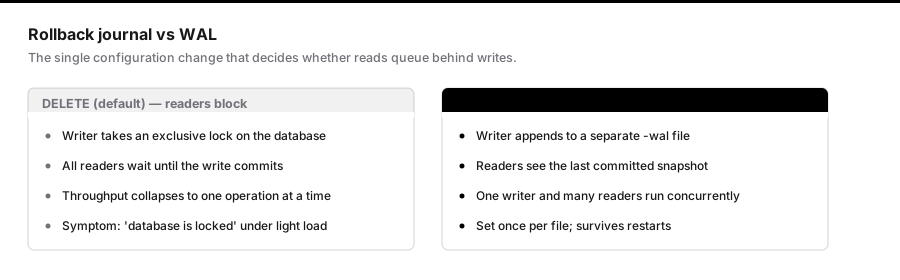
SQLite allows exactly one writer at a time for the whole database. Not one per table. Not one per row. One per file.
Reads are a different story. In the default rollback-journal mode, a write blocks all readers. In write-ahead logging mode it does not — readers continue against the last committed snapshot while a write is in progress. This is the single most important configuration change you will make:
PRAGMA journal_mode = WAL;
This is persistent. You set it once per database file and it survives restarts. Without it, a moderately busy application will serialise every read behind every write, and you will conclude SQLite is slow when what you actually built is a queue.
The setting nobody sets
When a write cannot acquire the lock, SQLite does not wait by default. It immediately returns SQLITE_BUSY, which surfaces in your application as database is locked.
This is the error people encounter, and it is the reason SQLite gets abandoned. The fix is one line:
PRAGMA busy_timeout = 5000;
Now a blocked writer will retry for five seconds before giving up. On a workload where writes take single-digit milliseconds, that is an effectively unlimited budget, and the errors disappear.
Two pragmas — journal_mode and busy_timeout — account for the overwhelming majority of "SQLite doesn't work" experiences.
A configuration that holds up
// config/database.php
'sqlite' => [
    'driver' => 'sqlite',
    'database' => database_path('database.sqlite'),
    'foreign_key_constraints' => true,
],
And the pragmas, applied on every connection:
DB::statement('PRAGMA journal_mode = WAL');
DB::statement('PRAGMA busy_timeout = 5000');
DB::statement('PRAGMA synchronous = NORMAL');
DB::statement('PRAGMA cache_size = -64000');   // 64MB, negative means KiB
DB::statement('PRAGMA foreign_keys = ON');
synchronous = NORMAL is the interesting one. In FULL, SQLite fsyncs on every commit. In NORMAL with WAL enabled, it fsyncs at checkpoints instead. You trade the durability of the last few transactions in a hard power loss for a large throughput gain. On a managed host with battery-backed storage that is usually a trade worth making. On hardware you do not control, think harder.
What the numbers actually look like
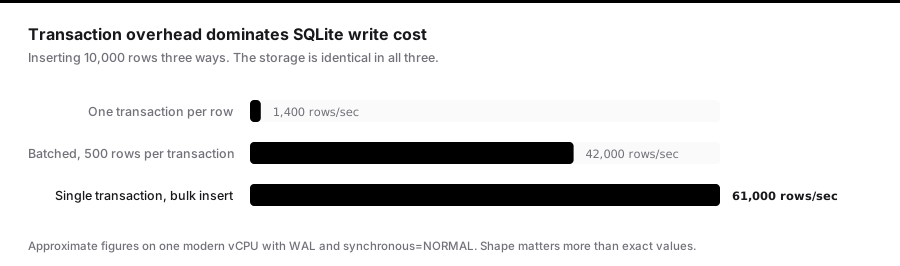
On a single modern vCPU with an SSD and the settings above, a rough shape:
| Operation | Approximate rate |
|---|---|
| Simple indexed reads | 100k+ / sec |
| Small writes, batched in a transaction | 50k+ / sec |
| Small writes, one transaction each | 1k–5k / sec |
That last row is the one that matters. Transaction overhead dominates write cost. A loop that inserts 10,000 rows individually will take seconds; the same loop wrapped in a single transaction takes milliseconds.
// Slow: 10,000 transactions
foreach ($rows as $row) {
    Reading::create($row);
}

// Fast: one transaction
DB::transaction(function () use ($rows) {
    foreach (array_chunk($rows, 500) as $chunk) {
        Reading::insert($chunk);
    }
});
Where it genuinely does not fit
Being fair about the limits is what makes the recommendation credible:
- Multiple application servers. SQLite is a file. Two web servers cannot safely share one over a network filesystem. If you need horizontal application scaling with a shared database, you need a database server.
- Sustained high-concurrency writes. If your steady state is hundreds of independent writes per second from many connections, the single-writer lock becomes the ceiling.
- Managed failover expectations. There is no built-in replication story comparable to Postgres streaming replication. Tools like Litestream and LiteFS exist and are good, but they are additions, not defaults.
If none of those describe your application — and for a great many applications none of them do — the operational simplicity is enormous. No connection pool. No network hop. No separate process to monitor, patch, or pay for.
Backups are not cp
Copying the database file while writes are in flight gives you a corrupt file. Use the backup API, which is transaction-aware:
sqlite3 database.sqlite ".backup '/backups/db-$(date +%Y%m%d-%H%M).sqlite'"
Or run Litestream, which streams the WAL to object storage continuously and gives you point-in-time recovery. It is a single binary with a small config file, and it turns the "what if the disk dies" objection into a solved problem.
Checkpointing
In WAL mode, writes accumulate in a separate -wal file and are periodically folded back into the main database. If the WAL grows without checkpointing — usually because a long-running read transaction is holding an old snapshot open — the file grows unbounded.
Watch for it:
PRAGMA wal_checkpoint(TRUNCATE);
The usual culprit is an application holding a transaction open across a slow external call. Keep transactions short and this never comes up.
The honest summary
SQLite is a production database for a specific shape of application: single-node, read-heavy, with writes that batch well. Within that shape it is faster than a networked database because it skips the network entirely, and dramatically simpler to operate.
Set journal_mode = WAL, set busy_timeout, batch your writes into transactions, and back up with the backup API. Those four things convert almost every horror story back into a boring, fast database.
Concurrency in practice: what your connection actually does
The pragmas above are per-connection, not per-database, with the exception of journal_mode. This trips people up constantly. You set busy_timeout on the connection you happened to be holding when you ran the migration, then wonder why production still throws lock errors — because every new connection starts at the default of zero.
In Laravel, attach them to connection establishment rather than running them once:
// app/Providers/AppServiceProvider.php
public function boot(): void
{
    if (DB::connection() instanceof SQLiteConnection) {
        DB::statement('PRAGMA journal_mode = WAL');
        DB::statement('PRAGMA busy_timeout = 5000');
        DB::statement('PRAGMA synchronous = NORMAL');
        DB::statement('PRAGMA foreign_keys = ON');
        DB::statement('PRAGMA cache_size = -64000');
        DB::statement('PRAGMA temp_store = MEMORY');
    }
}
temp_store = MEMORY is worth adding. Without it, SQLite spills temporary B-trees for sorting and grouping to disk. On a query with a large ORDER BY that has no supporting index, this is often the difference between 40ms and 400ms.
The immediate-transaction trick
There is a subtle deadlock in SQLite that busy_timeout alone does not fix.
By default, BEGIN starts a deferred transaction. SQLite does not take any lock until the first statement runs. If your transaction reads first and writes later, it acquires a read lock, then attempts to upgrade to a write lock. If another connection did the same thing, both hold read locks, both want to upgrade, and neither can — because upgrading requires no other readers.
SQLite cannot resolve this by waiting, so it returns SQLITE_BUSY immediately, ignoring your busy timeout entirely. This is the one case where the timeout does not help.
The fix is to declare write intent up front:
BEGIN IMMEDIATE;
An immediate transaction takes the write lock at BEGIN. Contending connections now block properly and honour busy_timeout instead of failing instantly.
DB::statement('BEGIN IMMEDIATE');
try {
    // read, then write
    DB::commit();
} catch (Throwable $e) {
    DB::rollBack();
    throw $e;
}
If you take one thing beyond WAL from this article, take this. Read-then-write transactions under concurrency are the most common remaining source of "database is locked" once the obvious pragmas are set.
Schema changes and the ALTER limitation
SQLite's ALTER TABLE is limited. It supports RENAME TO, RENAME COLUMN, ADD COLUMN, and — since 3.35 — DROP COLUMN. It does not support changing a column type, adding or removing a constraint, or changing a default.
The official workaround is the twelve-step procedure, and Laravel's schema builder performs a version of it for you. What matters is understanding what happens: SQLite creates a new table with the desired shape, copies every row, drops the original, and renames. On a large table this is a full rewrite while holding the write lock.
Schema::table('orders', function (Blueprint $table) {
    $table->string('status')->default('pending')->change();   // full table rewrite
});
Plan migrations accordingly. On a 10-million-row table this is minutes of blocked writes, and unlike Postgres there is no concurrent variant.
One important detail: run these with PRAGMA foreign_keys = OFF and re-enable afterwards, or the table copy can trip constraints mid-flight. Laravel handles this; hand-written migrations often do not.
Backups, properly
cp database.sqlite backup.sqlite while writes are in flight produces a corrupt file, because you may capture the main database mid-checkpoint without the matching WAL contents.
Three approaches that work, in increasing order of robustness:
The backup API, which is transaction-aware and safe against a live database:
sqlite3 database.sqlite ".backup '/backups/db-$(date +%Y%m%d-%H%M).sqlite'"
VACUUM INTO, available since 3.27, which produces a defragmented copy:
VACUUM INTO '/backups/db-2026-08-26.sqlite';
This is often the better choice — it compacts free pages, so the backup is smaller than the live file, and it does not require the CLI.
Litestream, which streams WAL frames to object storage continuously:
dbs:
  - path: /var/www/app/database/database.sqlite
    replicas:
      - type: s3
        bucket: my-app-backups
        path: prod
        retention: 720h
Point-in-time recovery to any second within the retention window, from a single binary. This is what turns "what if the disk dies" from an objection into a solved problem, and it is the piece that makes single-node SQLite defensible for real production systems.
Whichever you choose, restore-test it on a schedule. A backup you have never restored is a hypothesis.
Checking integrity
SQLite is extremely reliable, but hardware is not. Verify periodically:
PRAGMA integrity_check;      -- full verification, slow on large files
PRAGMA quick_check;          -- structural only, much faster
PRAGMA foreign_key_check;    -- orphaned references
Run quick_check after every deploy and integrity_check weekly out of hours. A corrupted page detected on Tuesday is a restore; one detected six weeks later may be past your retention.
Monitoring worth having
Four numbers tell you almost everything about a SQLite deployment's health:
| Signal | How to read it | What it means |
|---|---|---|
-wal file size |
ls -la database.sqlite-wal |
Growing without bound means checkpoints are blocked |
| Busy/locked error rate | Application logs | Contention exceeding your timeout budget |
| p99 write latency | Application metrics | Lock waiting, or fsync stalls |
PRAGMA page_count × page_size |
Scheduled job | Growth rate, and free-page ratio |
The WAL size is the one people miss. If it grows steadily and never truncates, some connection is holding a read transaction open across something slow — an external HTTP call inside a transaction is the classic cause. Everything else is downstream of that.
The decision, stated plainly
Use SQLite when your application runs on one node, reads far more than it writes, and your writes batch well. You get no network hop, no connection pool, no separate process to operate, and a database you can copy to your laptop to debug.
Use a database server when you need multiple application servers sharing state, sustained high-concurrency independent writes, or managed failover as a product feature rather than a tool you assemble.
The failure mode worth avoiding is choosing SQLite for its simplicity and then reproducing all of Postgres's operational complexity around it. If you find yourself building replication, connection brokering, and failover on top, the simplicity argument has already evaporated and you should have run Postgres from the start.