
Most "zero-downtime deploy" guides stop at the atomic symlink swap. That part is genuinely easy. The parts that take your site down at 2pm on a Tuesday are the ones nobody writes about: a worker still running last week's code, an opcache serving a file that no longer exists, and a migration holding an exclusive lock on your largest table.
The release layout
The foundation is a directory structure where activating a release is a single atomic operation:
/var/www/app/
├── releases/
│   ├── 20260824143000/
│   ├── 20260825091200/
│   └── 20260826080000/     <- new
├── shared/
│   ├── .env
│   └── storage/
└── current -> releases/20260826080000
Build the new release completely, then move the symlink:
ln -sfn /var/www/app/releases/20260826080000 /var/www/app/current.tmp
mv -Tf /var/www/app/current.tmp /var/www/app/current
The two-step dance matters. ln -sfn onto an existing symlink is not atomic — it unlinks then relinks, and there is a window where current does not exist. mv -T on the same filesystem is a single rename() syscall, which is atomic. Requests either see the old release or the new one, never nothing.
Opcache: the one that surprises people
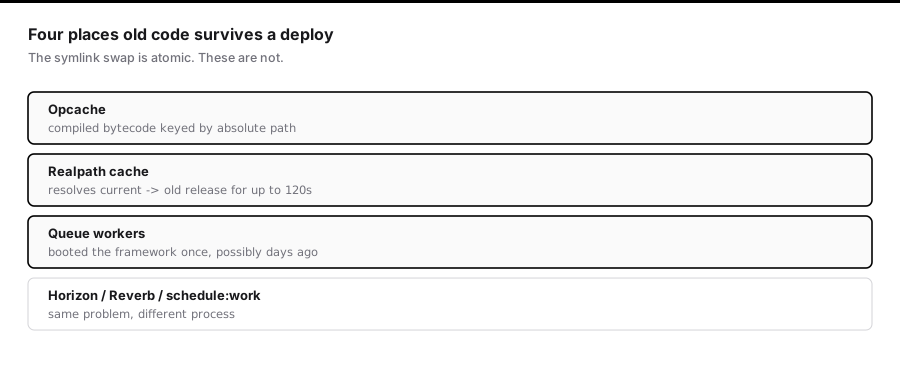
PHP-FPM caches compiled bytecode keyed by absolute file path. When the symlink flips, the paths change — so in principle the new files are compiled fresh.
In practice, two things go wrong.
opcache.revalidate_freq delays pickup. If it is set above zero, PHP will keep serving the cached compilation for that many seconds even after the file changes. In a deploy, that is stale code serving live traffic.
Realpath cache. PHP caches the resolution of current → releases/xxx separately, with its own TTL (realpath_cache_ttl, default 120 seconds). Even with opcache correct, PHP can resolve current/index.php to the old release directory for two minutes after the swap. If you have already deleted that release, you get a hard failure.
The reliable fix is to reload PHP-FPM after the swap:
sudo systemctl reload php8.3-fpm
reload (SIGUSR2), not restart. FPM finishes in-flight requests on the old workers and starts new ones with a clean cache. No dropped connections.
If you cannot reload — shared hosting, containers without privileges — call opcache_reset() and clearstatcache(true) from a deploy endpoint. It is less reliable, because it only resets the pool that happens to serve that one request, but it is better than nothing.
Never delete the previous release immediately. Keep at least three. A request that resolved the old path before the realpath cache expired still needs those files.
Queue workers run old code
This is the failure people find hardest to diagnose, because the web tier looks completely healthy.
queue:work is a long-running PHP process. It boots the framework once and loops. Deploying new code does nothing to a process that is already running — it keeps executing the version it loaded at boot, potentially for days.
Concretely: you deploy a change to ProcessInvoice, and jobs continue running the old logic. Or worse, you deploy a migration renaming a column, and the old worker code queries a column that no longer exists.
php artisan queue:restart
This does not kill anything. It sets a timestamp in the cache; each worker checks it between jobs and exits gracefully when it sees a newer value. Your process supervisor restarts it, and it boots the new code.
Two consequences worth internalising:
- A worker mid-job finishes that job first. If your longest job runs 10 minutes, old code is live for up to 10 minutes after deploy.
- Run
queue:restartafter the symlink swap. Run it before, and workers restart into the old release.
The same applies to anything long-running: Horizon (horizon:terminate), Reverb, custom daemons, schedule:work.
Migrations are the real risk
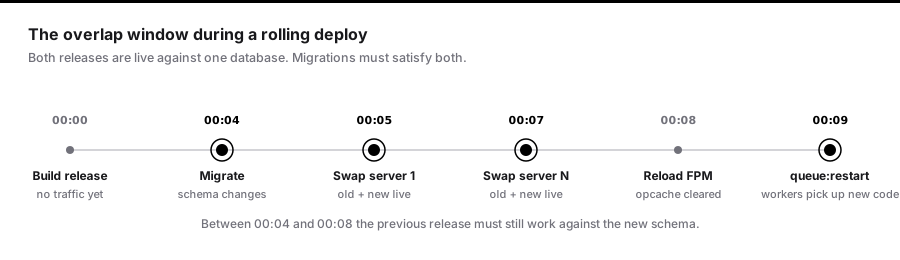
The symlink swap is atomic. Your database migration is not.
The overlap window. Between the first server swapping and the last, both old and new code are live against one database. Any migration that is not backwards-compatible with the previous release will break requests during that window.
The rule: a migration must work with both the code before it and the code after it.
That makes renaming a column a multi-deploy operation:
| Deploy | Migration | Code |
|---|---|---|
| 1 | Add full_name, backfill |
Write both, read name |
| 2 | — | Write both, read full_name |
| 3 | Drop name |
Read/write full_name only |
Tedious, and unavoidable if you want zero downtime.
Locking. On MySQL and Postgres, some DDL takes an exclusive lock for the duration. Adding a column with a default on a 50-million-row table can lock writes for minutes while every row is rewritten. Modern Postgres (11+) and MySQL (8.0) handle the simple ADD COLUMN ... DEFAULT case instantly, but adding an index does not:
-- Postgres: build the index without blocking writes
CREATE INDEX CONCURRENTLY idx_orders_customer ON orders (customer_id);
In Laravel, that needs to run outside a transaction:
public $withinTransaction = false;

public function up(): void
{
    DB::statement('CREATE INDEX CONCURRENTLY idx_orders_customer ON orders (customer_id)');
}
Set a lock timeout so a migration fails fast instead of queueing every write behind it:
SET lock_timeout = '5s';
A migration that fails is an inconvenience. A migration that holds an exclusive lock for four minutes is an outage.
Cache warming, in the right order
php artisan config:cache
php artisan route:cache
php artisan view:cache
php artisan event:cache
Run these in the new release directory, before the symlink swap. Building caches after the swap means live traffic hits the application while its caches are half-written.
Note that config:cache means env() returns null outside config files. If any application code calls env() directly, it will start returning null the moment you enable config caching. Move those to config().
A deploy that holds together
set -euo pipefail

REL="/var/www/app/releases/$(date +%Y%m%d%H%M%S)"

git clone --depth 1 -b main [email protected]:you/app.git "$REL"
ln -s /var/www/app/shared/.env "$REL/.env"
rm -rf "$REL/storage" && ln -s /var/www/app/shared/storage "$REL/storage"

composer install --no-dev --optimize-autoloader --no-interaction -d "$REL"
npm --prefix "$REL" ci && npm --prefix "$REL" run build

php "$REL/artisan" config:cache
php "$REL/artisan" route:cache
php "$REL/artisan" view:cache

php "$REL/artisan" migrate --force --isolated

ln -sfn "$REL" /var/www/app/current.tmp
mv -Tf /var/www/app/current.tmp /var/www/app/current

sudo systemctl reload php8.3-fpm
php /var/www/app/current/artisan queue:restart

cd /var/www/app/releases && ls -1t | tail -n +4 | xargs -r rm -rf
--isolated is worth calling out: it takes a lock so that when five servers deploy simultaneously, exactly one runs the migrations. Without it, concurrent migrate calls race.
What to check afterwards
- Error rate for 60 seconds after the swap, not just at the moment of it.
- Queue depth — a spike means workers did not come back.
- That the oldest live worker started after your deploy timestamp.
Zero downtime is not one trick. It is an atomic swap, a cache you actually invalidate, workers you actually restart, and migrations written so two versions of your code can share one database.
Health checks that mean something
A load balancer that removes a server the instant it stops responding is only as good as the endpoint it polls. Most health checks return 200 OK unconditionally, which means they verify that PHP is running and nothing else.
Separate liveness from readiness — they answer different questions:
// Liveness: is this process functional? Keep it trivial and dependency-free.
Route::get('/health/live', fn () => response()->json(['status' => 'ok']));

// Readiness: can this instance serve real traffic right now?
Route::get('/health/ready', function () {
    $checks = [];

    try {
        DB::select('SELECT 1');
        $checks['database'] = 'ok';
    } catch (Throwable $e) {
        $checks['database'] = 'fail';
    }

    try {
        Cache::store('redis')->put('health', 1, 5);
        $checks['cache'] = 'ok';
    } catch (Throwable $e) {
        $checks['cache'] = 'fail';
    }

    $healthy = ! in_array('fail', $checks, true);

    return response()->json(['status' => $healthy ? 'ok' : 'degraded'] + $checks,
        $healthy ? 200 : 503);
});
The distinction matters during deploys. A container that is alive but not yet warm should fail readiness so it receives no traffic, while still passing liveness so the orchestrator does not kill and restart it in a loop.
Never put a dependency check in the liveness probe. A Redis outage would then cause every container to be killed and restarted, converting a degraded cache into a total outage.
Draining connections properly
The web tier has the same race as the queue, described from the other side.
When an instance is marked for removal, two things happen concurrently and in no guaranteed order: the process receives SIGTERM, and the load balancer removes it from the pool. If SIGTERM arrives first, requests continue arriving at a process that has stopped accepting them.
lifecycle:
  preStop:
    exec:
      command: ["sh", "-c", "sleep 5"]
The sleep looks like superstition and is not. It delays SIGTERM long enough for deregistration to propagate. Five seconds covers most load balancers; check your target group's deregistration delay and match it.
With PHP-FPM, also make sure the graceful stop timeout exceeds your slowest request:
process_control_timeout = 30s
Below this, FPM kills workers mid-request during a reload, producing exactly the intermittent 502s that are so hard to attribute afterwards.
Rolling back
The point of keeping old releases is that rollback is a symlink move:
#!/usr/bin/env bash
set -euo pipefail

PREV=$(ls -1t /var/www/app/releases | sed -n '2p')

ln -sfn "/var/www/app/releases/$PREV" /var/www/app/current.tmp
mv -Tf /var/www/app/current.tmp /var/www/app/current

sudo systemctl reload php8.3-fpm
php /var/www/app/current/artisan queue:restart

echo "Rolled back to $PREV"
Seconds, not minutes. But note what this does not roll back: the database.
This is why backwards-compatible migrations are not merely good practice — they are what makes rollback possible at all. If deploy N added a column the code requires and you roll back to N-1, the old code must still work against the new schema. If it does not, your rollback path is a restore from backup, which is a completely different class of event.
The rule follows directly: never roll back a migration as part of an incident response. Roll the code back, leave the schema forward. Fix the schema in a subsequent, considered deploy.
Warming caches before traffic arrives
An instance that passes readiness the microsecond it boots will serve its first hundred requests slowly — cold opcache, cold application caches, cold connection pools. At scale that shows up as a latency spike on every deploy.
Warm it before declaring readiness:
class WarmCaches extends Command
{
    protected $signature = 'app:warm';

    public function handle(): int
    {
        // Touch the paths that populate expensive shared caches
        foreach (['/', '/creations', '/blog'] as $path) {
            $this->call('route:list', []);   // ensures route cache is loaded
            app()->handle(Request::create($path, 'GET'));
        }

        SiteSetting::getGroup('general');   // populates the settings cache

        $this->info('Warm.');

        return self::SUCCESS;
    }
}
Run it after the symlink swap and before the instance reports ready. On a small fleet this is optional; above a handful of instances it removes a visible sawtooth from your latency graphs.
Deploying the scheduler safely
schedule:run is invoked every minute by cron against current/artisan. During a deploy there is a window where the symlink has moved but caches are still building, and a scheduled task firing at that instant can behave unpredictably.
Two protections, both cheap:
Schedule::command('reports:generate')
    ->hourly()
    ->withoutOverlapping()      // a slow run does not stack
    ->onOneServer();            // only one instance runs it
onOneServer requires a shared cache store — it takes a lock so that when six servers all run schedule:run at the same second, exactly one executes the task. Without it, an hourly report generates six times, and if it emails customers, it emails them six times.
The pieces, assembled
| Concern | Mechanism | Failure if omitted |
|---|---|---|
| Atomic release | mv -Tf on a symlink |
Window with no current directory |
| Stale bytecode | systemctl reload php-fpm |
Old code served after swap |
| Stale path resolution | Keep 3+ old releases | Hard failures for up to realpath_cache_ttl |
| Workers on old code | queue:restart after swap |
Jobs run last week's logic |
| Schema compatibility | Expand/contract migrations | Errors during the overlap window |
| Lock storms | SET lock_timeout |
One migration blocks the whole table |
| Concurrent migrations | migrate --isolated |
Several servers race the same migration |
| LB race on shutdown | preStop sleep |
Connection-refused errors every deploy |
| Cold start latency | Warm before readiness | Latency spike on every deploy |
| Duplicated cron | onOneServer |
Scheduled tasks run once per server |
None of these is difficult in isolation. Zero-downtime deployment is simply the discipline of not skipping any of them, and the reason it is worth the effort is that the alternative — a maintenance window — costs you far more than the hour it takes to set this up once.
What to watch after the swap
Deploys rarely fail at the moment of the swap. They fail in the sixty seconds afterwards, when workers restart, caches rebuild, and the first real traffic hits new code.
Watch four things:
- Error rate for a full minute, not just at swap time.
- Queue depth and oldest-job age — a spike means workers did not come back.
- Oldest worker start time — it must be later than your deploy timestamp.
- p99 latency, which will show cold-cache effects your average hides.
If your deploy tooling can automatically roll back on an error-rate threshold, wire that up. A rollback that happens in twenty seconds without a human being paged is worth more than any amount of pre-deploy checking.