
You write a loop over 50 posts and print each author's name. Your ORM issues 51 queries: one for the posts, then one per post for its author.
Locally, with twelve rows and a database on the same machine, this takes 4 milliseconds and you ship it. In production, with 50 rows and a 1.5ms network hop to the database, it takes 80 milliseconds — and the endpoint that used to be fast is now the slowest thing in your application.
This is the N+1 problem. It is the single most common performance defect in ORM-backed code, and it is almost entirely preventable at the framework level.
What it looks like
$posts = Post::latest()->take(50)->get();          // 1 query

foreach ($posts as $post) {
    echo $post->author->name;                      // 50 queries
}
Eloquent loads relations lazily. $post->author is not data that came back with the post — it is a property accessor that fires a fresh SELECT the first time you touch it.
The fix
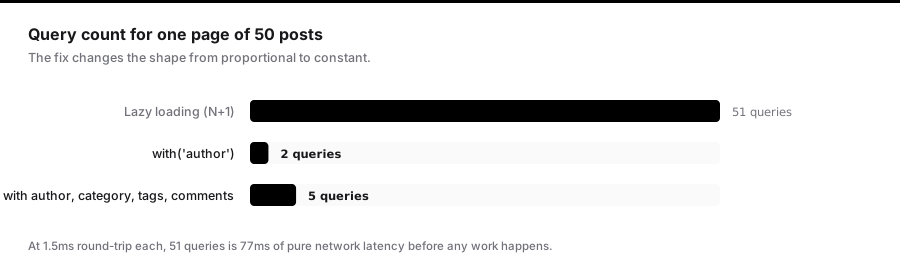
Tell the ORM what you need up front:
$posts = Post::with('author')->latest()->take(50)->get();
Now there are two queries. One for the posts, one for all their authors:
SELECT * FROM posts ORDER BY created_at DESC LIMIT 50;
SELECT * FROM users WHERE id IN (1, 4, 7, 12, ...);
Eloquent then stitches the results together in PHP. Two queries instead of 51, and the second one is a single indexed IN lookup.
Nested and multiple relations
Dot notation goes as deep as you need:
Post::with([
    'author',
    'category',
    'comments.author',        // comments, and each comment's author
    'tags',
])->get();
That is five queries total regardless of how many posts, comments, or tags come back. The shape is constant, not proportional to the result set — that is the property you are optimising for.
Counting without loading
A frequent mistake is loading an entire relation just to count it:
// Loads every comment row into memory to call count()
$post->comments->count();
Ask the database instead:
$posts = Post::withCount('comments')->get();

foreach ($posts as $post) {
    echo $post->comments_count;    // no extra query, no rows loaded
}
withCount adds a correlated subquery to the original statement. Zero additional round trips, and none of the comment bodies cross the wire.
You can constrain it too:
Post::withCount([
    'comments',
    'comments as approved_comments_count' => fn ($q) => $q->where('approved', true),
])->get();
Loading only what you need
Eager loading fetches whole rows by default. If you need two columns from a large table, say so — and always include the foreign key, or the stitching silently fails:
Post::with('author:id,name,avatar_url')->get();
Omit id and Eloquent has nothing to match against; every $post->author comes back null.
Finding them
Turn on lazy-loading prevention. This is the highest-leverage change in this article. In AppServiceProvider:
public function boot(): void
{
    Model::preventLazyLoading(! app()->isProduction());
}
Now any lazy load in development throws LazyLoadingViolationException naming the model and relation. You cannot ship an N+1 without seeing it, because your test suite and your local browsing both fail loudly.
In production it stays off — you want a slow page, not a 500.
Prefer to log rather than throw in staging:
Model::handleLazyLoadingViolationUsing(function (Model $model, string $relation) {
    Log::warning('Lazy load detected', [
        'model' => $model::class,
        'relation' => $relation,
    ]);
});
Count queries in tests. Assert the shape directly:
public function test_index_does_not_scale_queries_with_row_count(): void
{
    Post::factory()->count(20)->create();

    DB::enableQueryLog();
    $this->get('/posts')->assertOk();
    $queries = count(DB::getQueryLog());

    $this->assertLessThan(10, $queries, "Index page issued {$queries} queries.");
}
This test fails the moment someone adds a lazy relation to the view, which is exactly when you want to know.
The traps
Eager loading inside a loop does nothing. Calling ->load() per item is the same N+1 with extra syntax:
foreach ($posts as $post) {
    $post->load('author');    // still one query each
}
Load once, on the collection: $posts->load('author').
Accessors that touch relations. An innocent-looking accessor can reintroduce the problem from inside your model:
public function getSummaryAttribute(): string
{
    return "{$this->author->name} — {$this->title}";   // hidden lazy load
}
Nothing at the call site suggests a query. Lazy-loading prevention catches these; reading the code usually does not.
Over-eager loading. The opposite failure: loading six relations on a page that uses one. You have traded 50 small queries for one enormous join-free fetch of data nobody reads. Load what the view needs, and no more.
Conditional relations. When only some rows need a relation, with still loads it for all of them. loadMissing on the subset is often better.
Pagination changes the maths
With pagination, N is bounded by page size — 25 rows means 26 queries, not 26,000. That is survivable, which is exactly why these bugs live so long. The endpoint is slow, not broken, so it never gets prioritised.
It is still 26 network round trips where 2 would do. At 1.5ms each that is 39ms of pure latency you are choosing to spend.
The routine that works
- Enable
preventLazyLoadingin development. Non-negotiable. - Eager load explicitly at the query, listing every relation the view touches.
- Use
withCountfor counts, never->relation->count(). - Select only the columns you need, including foreign keys.
- Assert query counts in tests for your heaviest endpoints.
Step one finds essentially all of them. The rest is fixing what it shows you.
Polymorphic relations need a different tool
with() on a polymorphic relation cannot eager load the nested relations of each type, because the types differ per row. This is a common source of N+1 that survives an otherwise thorough audit.
// Loads each commentable, but not its author
Comment::with('commentable')->get();
Use morphWith to specify per-type loading:
Comment::with([
    'commentable' => fn (MorphTo $morphTo) => $morphTo->morphWith([
        Post::class  => ['author', 'category'],
        Video::class => ['channel'],
    ]),
])->get();
Now each type gets exactly the relations it needs, in a bounded number of queries — one per distinct type rather than one per row.
Aggregates beyond counting
withCount has siblings that are less well known and remove entire classes of N+1:
Post::withSum('orders', 'total_cents')
    ->withAvg('reviews', 'rating')
    ->withMax('comments', 'created_at')
    ->withExists('reports')
    ->get();

$post->orders_sum_total_cents;
$post->reviews_avg_rating;
$post->comments_max_created_at;
$post->reports_exists;
withExists deserves special attention. The common pattern is:
if ($post->comments()->count() > 0) { ... }
That counts every row to answer a yes/no question. withExists compiles to EXISTS (...), which stops at the first match — on a post with 40,000 comments the difference is substantial.
The subquery pattern
For "the latest related row", eager loading is the wrong shape entirely. You do not want all the orders; you want one field from the most recent one.
$users = User::addSelect(['last_order_at' => Order::select('created_at')
    ->whereColumn('user_id', 'users.id')
    ->latest()
    ->limit(1),
])->get();

$user->last_order_at;
One query total, no relation loaded, no rows discarded. Eager loading orders and taking ->first() in PHP would fetch every order for every user to use one timestamp from each.
You can order by it too, which is otherwise awkward:
User::orderByDesc(Order::select('created_at')
    ->whereColumn('user_id', 'users.id')
    ->latest()
    ->limit(1)
)->get();
Chunking without reintroducing the problem
Long-running jobs process in chunks. Eager loading must be declared on the query, not inside the loop:
// Correct: relations load once per chunk
Post::with('author', 'tags')
    ->chunkById(500, function ($posts) {
        foreach ($posts as $post) {
            $this->index($post);
        }
    });
Three queries per chunk, regardless of chunk size. Written the other way — loading inside the closure — you get 500 extra queries per chunk and a job that takes an hour instead of a minute.
Prefer chunkById over chunk. Plain chunk uses OFFSET, which both degrades on large tables and silently skips rows if the result set is modified while you iterate — which it will be, if the job you are running updates the rows it processes.
Counting queries in CI, not just in tests
A single assertion on one endpoint is a start. A general guard is better:
abstract class TestCase extends BaseTestCase
{
    protected function assertQueryCountUnder(int $max, Closure $callback): void
    {
        DB::flushQueryLog();
        DB::enableQueryLog();

        $callback();

        $queries = DB::getQueryLog();
        DB::disableQueryLog();

        $this->assertLessThan($max, count($queries), sprintf(
            "Expected fewer than %d queries, got %d:\n%s",
            $max,
            count($queries),
            collect($queries)->pluck('query')->take(20)->implode("\n")
        ));
    }
}
Printing the offending queries in the failure message is what makes this usable. A bare count tells someone a test failed; the list tells them which relation to eager load.
Reading the plan, not just the count
Two queries can be worse than fifty. Once you have eliminated N+1, the next question is whether the two remaining queries are any good.
DB::listen(function (QueryExecuted $query) {
    if ($query->time > 100) {
        Log::warning('query.slow', [
            'sql' => $query->sql,
            'bindings' => $query->bindings,
            'ms' => $query->time,
        ]);
    }
});
An eager load producing WHERE id IN (...) with 5,000 identifiers is technically one query and may well be slower than chunked loading. If your page size is large, with() can generate an IN clause big enough to blow past parameter limits — Postgres tolerates it, older MySQL configurations do not.
When that happens, reduce the page size rather than abandoning eager loading.
A worked before and after
A dashboard listing 25 projects with owner, status counts, and latest activity:
Before — 1 + 25 + 25 + 25 = 76 queries
$projects = Project::latest()->paginate(25);

foreach ($projects as $project) {
    $project->owner->name;
    $project->tasks->where('done', true)->count();
    $project->activities->sortByDesc('created_at')->first();
}
After — 2 queries
$projects = Project::with('owner:id,name')
    ->withCount(['tasks as done_tasks_count' => fn ($q) => $q->where('done', true)])
    ->addSelect(['last_activity_at' => Activity::select('created_at')
        ->whereColumn('project_id', 'projects.id')
        ->latest()
        ->limit(1),
    ])
    ->latest()
    ->paginate(25);
At 1.5ms of round-trip per query that is 114ms of latency removed, and none of it required a faster database, a cache, or a rewrite. It required saying what the page needed.
The routine, condensed
Model::preventLazyLoading(! app()->isProduction())inAppServiceProvider. This alone surfaces almost every instance.- Eager load explicitly at the query, naming every relation the view touches.
withCount,withSum,withExistsfor aggregates — never->relation->count().- Subquery selects for "one field from the latest related row".
morphWithfor polymorphic relations, whichwith()alone cannot handle.- Select only the columns you need, and always include the foreign key.
- Assert query counts on your heaviest endpoints, printing the queries on failure.
- Then check the remaining queries are actually fast.